

Why Korea eSIM Both Lines Not Working on iPhone

Summary
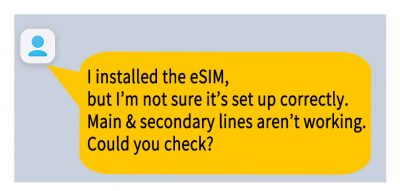
A customer living in the United States purchased a Korea eSIM on April 3.
The eSIM was successfully installed on their iPhone.
They wanted to use both their Korean number and U.S. number simultaneously,
so they turned on both the primary and secondary lines.
However, an issue occurred where neither line was connected.
Checking the Customer’s Phone Settings
After receiving the inquiry, we checked the customer’s settings.
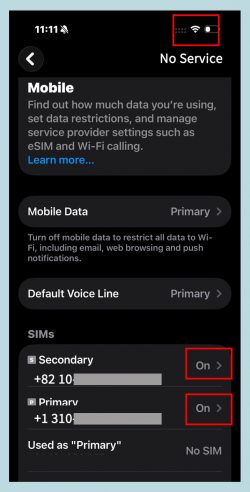
Both the primary and secondary lines were turned on, and Allow Cellular Data Switching was turned off.
At first glance, everything appeared normal.
However, in reality, the device showed “No Service”, meaning it was not connected to the network.
Cause of the Issue
On iPhone 13 and later models, it is possible to use two eSIMs simultaneously.
However, simply turning on both lines does not guarantee immediate connection.
This issue often occurs right after installation.
The phone needs time to determine which line to connect first.
During this process, the connection may be delayed or may fail to establish.
As a result, both lines may remain unconnected even though they are turned on.
Solutions
In this situation, connecting the lines in sequence is important.
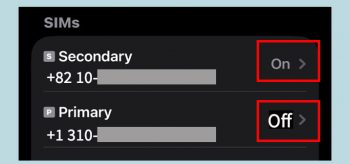
First, turn off the primary line.
Then, turn your phone off and turn it back on.
In many cases, the secondary line will connect first.
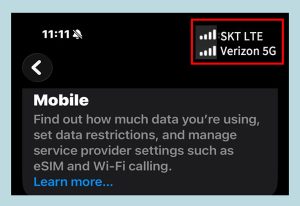
Check that the Korea eSIM is properly connected.
After that, turn the primary line back on.
This process should allow both lines to function normally.
Conclusion
Simply turning on both lines at the same time is not enough.
It is more stable to connect one line at a time, especially during the initial setup.
If you remember this sequence, you can avoid most issues.
Support
f you have any questions while purchasing or using a Korea eSIM from NeoKOSIM website,
el free to contact us at any time.
We will review your inquiry promptly and provide assistance.