

Why Does My New SKT Korea eSIM Not Work Even After Deleting the Previous One?

Overview
In most cases, the issue is resolved simply by deleting the previous Korea eSIM profile from the phone and restarting the device.
However, in some situations, a new eSIM may still fail to work even after the old eSIM has been completely removed. This issue usually cannot be resolved through simple reinstallation or settings changes.
The previous SKT Korea eSIM information may still remain on the carrier server and must be manually removed through customer support before the new eSIM can function normally.
Customer Questions
Many customers experience situations such as:
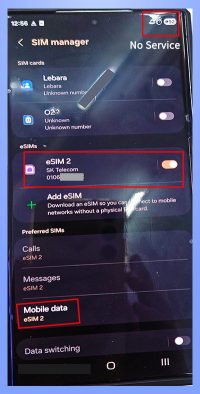
– “I deleted the previous eSIM, but the new eSIM still does not work.”
– “I already restarted the phone, but mobile data is still unavailable.”
– “Why does an expired eSIM still affect the new one?”
Most users believe they have already completed all necessary steps correctly, so it can be confusing when the problem continues.
Cause
* Difference Between user Perception and System Expiration Timing
– User may believe the eSIM has already expired, but the carrier system may still consider the eSIM active or not fully terminated.
Because of this timing difference between user side and the carrier system, the new eSIM may fail to activate properly.
* Old eSIM Profile Remaining on the Carrier Server
– Even if the Korea eSIM has been deleted from the device, the previous eSIM information may still remain on the SKT server.
– This can cause problems such as:
– New eSIM activation failure
– No mobile data or network connection
– Conflict with the previous eSIM profile
Solution
If the issue continues, please follow the steps below.
1. Contact Customer Support
– Provide the phone number previously used with the Korea SKT eSIM and request server-side removal (forced deletion) of the old eSIM information.
2. Restart the Device After Confirmation
– After customer support confirms the removal is complete, restart your phone.
3. Reactivate the New eSIM
– Activate the new eSIM again.
– The service should then work normally.