

KT Korea Pocket WiFi: Important Ordering Guide

Overview
– This guide explains the important things to know before ordering a KT Korea Pocket WiFi, including rental period selection, pickup and return locations, and required documents for pickup.
Simple Step:
1. Order the plan that matches your rental period
-. 12 days or less? → Order from the 1-Day Plan page.
-. 13 days or more? → Order from the 30-Day Plan page.
– For the 30-Day Plan, you may return the device anytime within 30 days.
2. Enter pickup & return date, location.
– Enter pickup and return (drop-Off) Date,
– Choose drop-off Location.
3. Enter Your Rental Days.
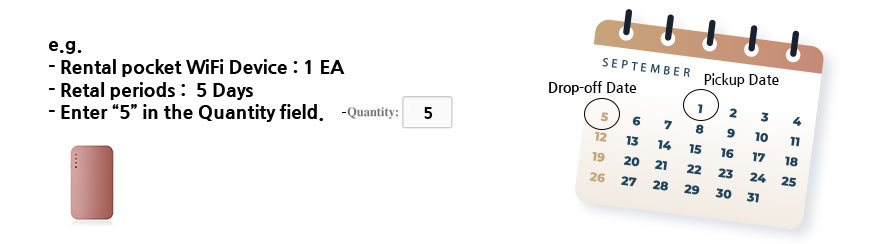
– Include both the pickup date and return date when calculating the total rental period.
– Example: Sept 1 – Sept 5 = Total rental period of 5 days
– Enter the number of your rental days into Quantity field, as shown image below.
4. Complete Your Order.
– Enter e-mail address to get voucher for picking up it.
– Choose pickup Location.
– Pay with global credit cards to complete order.
Important Notes
1. Required Documents for Pickup
– Present your ID/passport, voucher, and credit card.
2. Why Is My Credit Card Required?
– The credit card is required as a security deposit for the Pocket WiFi rental, and the payment will be automatically canceled after you return the device.
3. Different Pickup & Return Locations
– Your pickup and return locations can be different.
– Example:
– Pickup Location – Gimpo International Airport
– Return Location – Incheon International Airport Terminal 1
4. How to Extend Your Rental
– Contact us at least 1 day before your rental ends.
– Pay only for the extra days you need.
– Keep using your device during the extended period.