

How do I set up Roaming eSIM on my Android phone?
 KOR
KOR
Quick Summary
– Go to Settings > Connections > SIM card manager → Add mobile plan → Scan QR code
– Turn on your new eSIM and select it for Mobile Data
– Enable Data Roaming → Turn off automatic network → Select network
Step 1: Install eSIM (for China, Korea, Asia – 18 Countries, Europe – 28 countries)
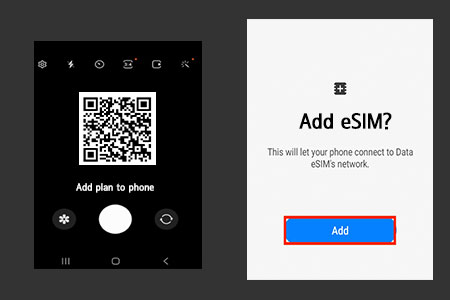
1. Go to Settings > Connections > SIM card Manager.
2. Select Add Mobile plan.
3. Scan the QR code (from another device or printout), or use the Camera app to scan it directly
4. Click Confirm until activation begins.
5. Wait for the eSIM to activate (this may take a few minutes — do not exit).
.
* Install it in advance in a stable Wi-Fi environment before your trip.
* “Activating…” or “Unable to Activate eSIM” before departure is normal (Don’t delete this eSIM).
Step 2: Activate New eSIM
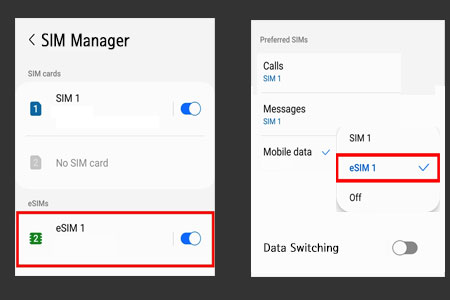
When you arrive at your destination, follow these steps:
1. Go to Settings > Connections > SIM card Manager.
2. Enable eSIM 1 mode in the eSIM options.
3. Go to Mobile Data → Set ‘eSIM 1’ as Mobile Data options.
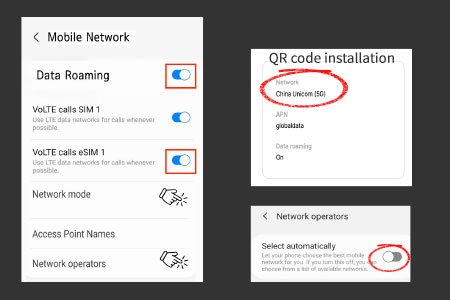
4. Enable Data roaming — make sure the correct SIM is selected.
5. Go to Network Operators and disable Select automatically.
6. Select the eSIM’s network (refer to the eSIM installation guide using a QR code).
* Turn off “Data Switching” (to avoid high roaming charges).
* Restart your phone if it doesn’t work right away.
What’s Roaming eSIM?
Roaming eSIM is a service that allows you to use data by connecting to local carrier networks via roaming across one or multiple countries without needing to swap a physical SIM. It is available in Korea, China, 18 countries in Asia, and 42 countries in Europe.