

How do I check my balance and usage with SKT?
Overview
If you’re traveling in Korea with an SKT prepaid SIM or eSIM,
don’t forget to check your data and balance from time to time.
It’s super easy to do and only takes a moment.
Simple Step:
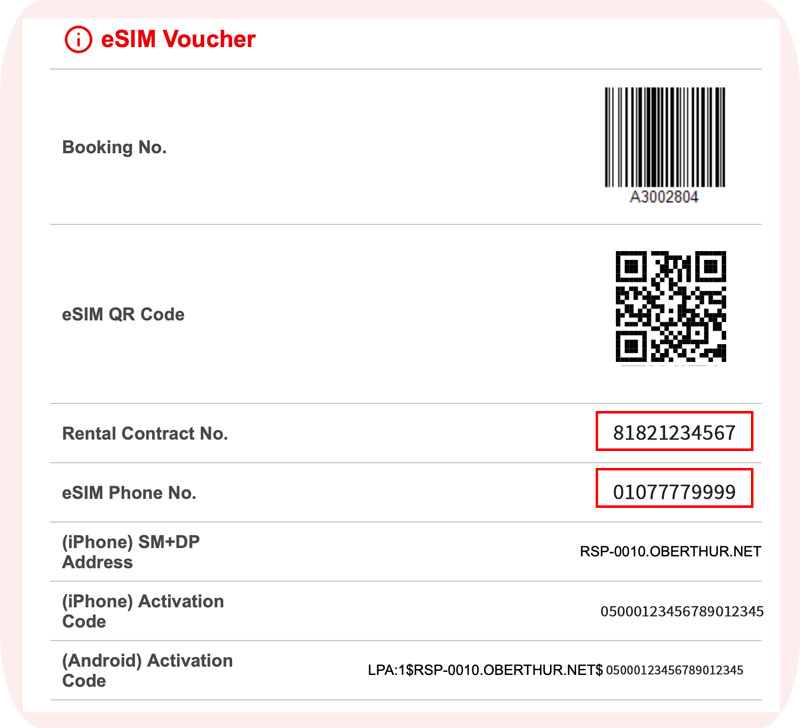
1. Check your contract and phone number.
– Find your rental contract number and mobile phone number on the SIM QR code (refer to below image).
– When picking up your SIM card, make sure to confirm both numbers on the contract sheet.
2. Check your account
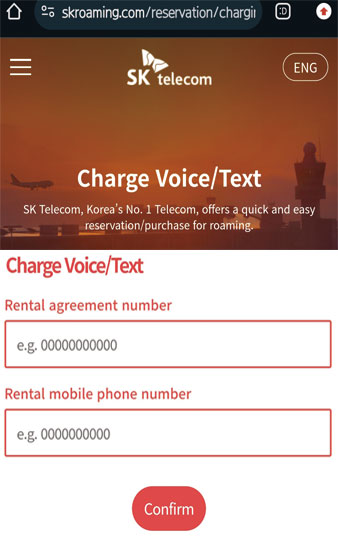
– Visit the webpage and tap here!
– Enter your rental contract number and mobile phone number (refer to below image).
– Tap ‘Confirm’.
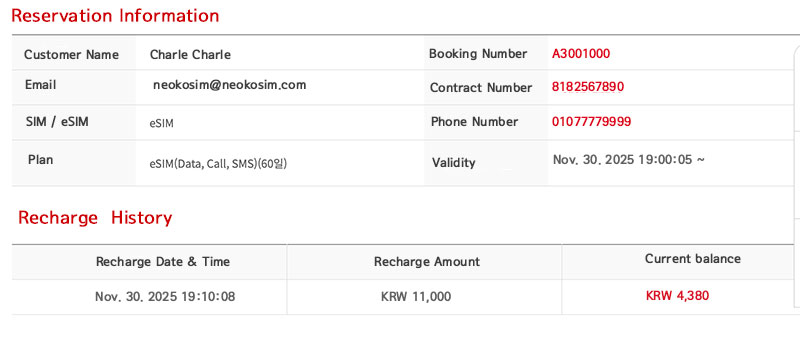
3. View your information and top-up details (refer to below image).
– Reservation Information: Name, plan type, contract number, mobile number, validity period, etc.
– Top-up Details: Top-up date and time, amount, current balance, etc.
Notes
– This information is available only after passport verification.
– The free top-up amount (KRW 1,320) is not shown in the recharge history,
but it is automatically added to your current balance.