

How do I rename (label) an eSIM on iPhone and Android?
Quick Tips
– Use simple names like Primary, Travel, Data, or Work.
– Helpful when using multiple SIMs or traveling abroad.
– Renaming does not affect your plan or connectivity.
For iPhone(iOS)
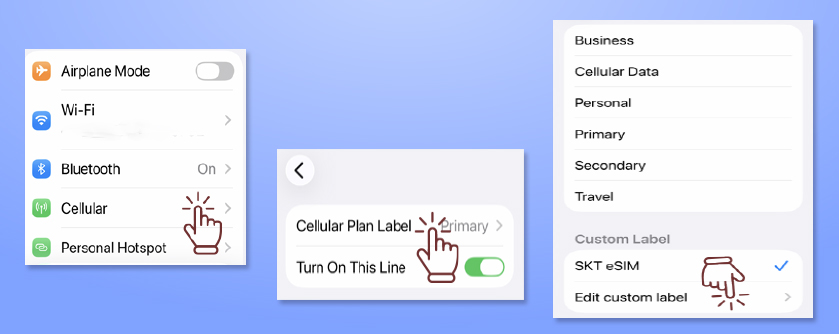
– Go to Settings > Cellular
– Tap the eSIM you want to rename.
– Tap Cellular Plan Label.
– Select a preset label or enter a custom name (e.g., Travel, Korea eSIM, NeoKOSIM, SKT eSIM…)
– You can change the label anytime without affecting service.
For Android phone
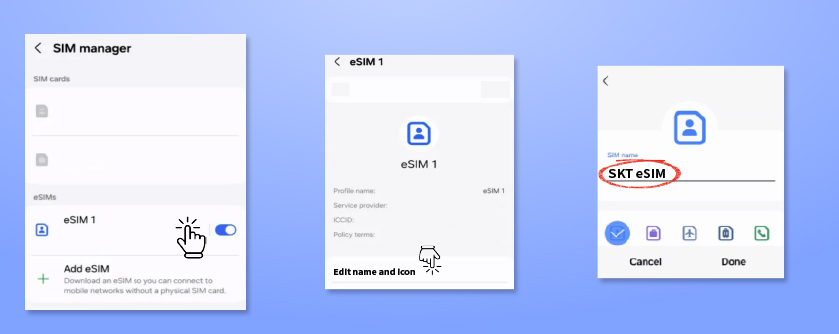
– Go to Settings > Connections (or Network & Internet)
– Tap SIM card manager or SIMs
– Select the eSIM you want to rename
– Tap Name / Edit / Label and enter a custom name (e.g., Travel, Korea eSIM, NeoKOSIM, SKT…)
– Menu names may vary slightly depending on device (e.g., Samsung, Pixel).