

Android eSIM Manual Setup Guide
Quick Setup Guide
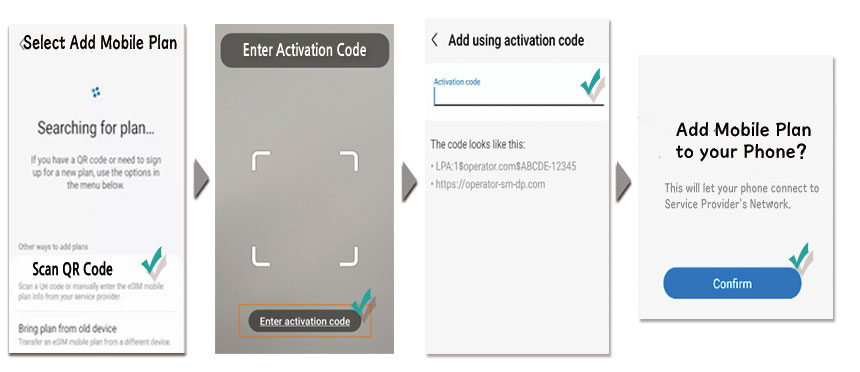
– Go to Settings > Connections
– Tap SIM Card Manager.
– Tap Add Mobile Plan.
– Scan the QR code of eSIM.
– Tap Enter Details Manually at the middle of the screen.
– Enter your SM-DP+ Address & Activation Code.
– Activate the new eSIM.
– Restart your phone if it doesn’t activate immediately.
What is SM-DP+ Address?
The SM-DP+ Address is a unique identifier that connects your device to your carrier’s eSIM server, enabling secure activation and management of your eSIM.
How does SM-DP+ Address work?
When activating your eSIM, your phone connects to the SM-DP+ server to download your plan details and configure settings automatically. The SM-DP+ Address is essential for manual eSIM activation.