

What should I do if I cannot make calls or send texts on LTE?
Why does this happen?
– After inserting your Korea SIM card or activating your Korea eSIM, mobile data may work normally while voice calls and text messages do not.
– This usually happens when your phone’s network mode is not configured correctly for voice and SMS services on Korean mobile networks.
How to Check Your Phone’s Network Mode
– Open the Settings app on your phone.
– Go to Connections (or Mobile Network, depending on your device).
– Tap Mobile Networks.
– Select Network Mode.
– Make sure LTE/3G (WCDMA) Auto Connect or a similar option is selected.
– If your phone is set to an LTE-only or CDMA-based network mode, voice calls and SMS may not work properly in Korea even though mobile data is available.
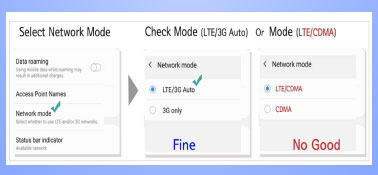
Tip: Before traveling to Korea, please check your phone’s network mode settings to ensure full compatibility with your Korea SIM card or Korea eSIM.