How to Verify Your Passport for eSIM Calls
Overview
Passport verification is required for activating voice calls on an SKT Korea eSIM.
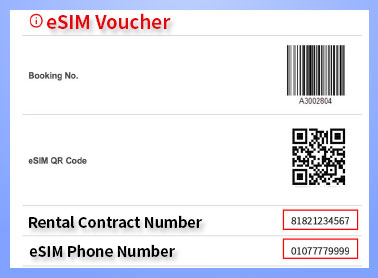
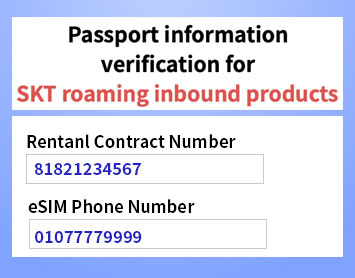
Check your contract and phone number in the your QR code email, as shown in the image below.
Simple Step:
1. Visit the Webpage
-. Tap here.
2. Skip the Pop-up
-. This is an informational screen about passport verification.
-. Tap anywhere on the screen below.
-. Tap the “X” in the top right corner to skip on the screen.
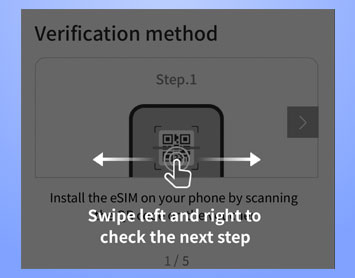
3. Enter Contract & Phone Number
-. Tap here.
-. Enter your contract number and phone number, as shown in the image below.
-. Tap Next.
4. Enter Your Passport Details
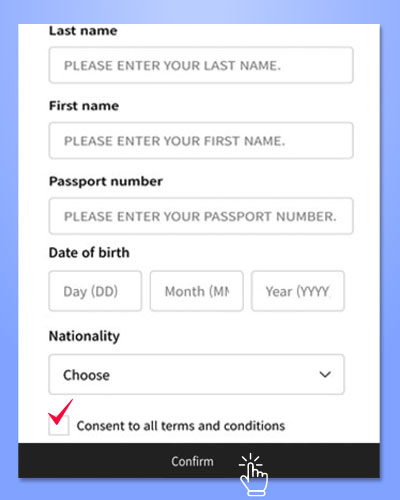
-. Enter your last name, first name, passport number, and date of birth.
-. Select your nationality, as shown in the image below.
-. Agree to the SKT eSIM service Terms & Conditions.
-. Tap Confirm.
* FYI, check out our Shorts video: tap here.
Important Notes
-. Passport verification is available after arrival in Korea, between 08:00 and 22:00 (KST).
-. Each line can be registered with only one foreign passport.
-. A single passport number cannot be used to verify multiple lines.
-. Until verification is complete, only data services are available; calls and texts are not supported.
-. After verification, recharge online to enable calls and texts.
-. Korean, ARC and F4-Visa Holder are not eligible for verification.
Popular FAQ
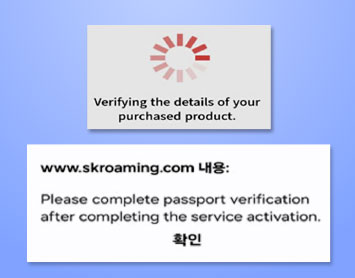
Q. Why does the “Verifying the details of your purchased product” error occur,
and how can I fix it, as shown in the image below ?
A. This error occurs when you attempt passport verification from outside Korea before arrival; activate data after entering Korea and try again.